

How to Improve Core Web Vitals in 2026
We all know that core web vitals play an important role in SEO. Google’s guidelines also say that Core Web Vitals are used by its ranking systems, and that sites should aim for good scores to support both visibility and user satisfaction. But at the same time, Google repeats that perfect scores do not guarantee top rankings. Now this statement leads many people astray as they think Why waste time on something that doesn’t promise rankings.
Although content quality, relevance, and your overall site authority play a wider role, core web vitals are still the only thing that helps you avoid being held back by a slow or unstable experience. So, if you want organic growth that encourages conversions and retention, LCP, INP, and CLS should be your focus. The main goal of targeting core web vitals is not to chase a perfect 100/100 score, but to build a fast, stable, and responsive website that your users can enjoy using.
What are the Core Web Vitals
Core Web Vitals are a set of performance metrics introduced by Google to measure how users actually experience a web page. Rather than focusing solely on how servers respond or theoretical speed, Core Web Vitals consider real-world interaction: how quickly a page loads, how long it takes to respond and how stable the page feels while elements like text and images are loading.
Three Core web vitals considered by search engines are LCP, INP, and CLS.
Largest Contentful Paint (LCP)
LCP measures the total time it takes for the main content of the page to load. The typical elements include the hero image, main heading, and main content block. Loading time less than 2.5 seconds for at least 75 percent of real users is considered a good score.
If your site has a slow LCP, it makes your website feel heavy and sluggish, making the users bounce.
Interaction to Next Paint (INP)
INP is the time a page takes to visually respond after any action performed by a visitor, like clicking on a button, opening a menu, adding to cart, etc. A time of less than 200ms among more than 75 percent of real users is considered a good score.
INP reveals JavaScript bloat, main-thread blocking tasks, and heavy third-party scripts. So if the INP is high, a user would likely end up feeling that your site is laggy.
Cumulative Layout Shift (CLS)
CLS tests how quickly minor layout shifts occur as a webpage loads. If your CLS is below 0.1 for at least 75 percent of users, you’re in a green zone.
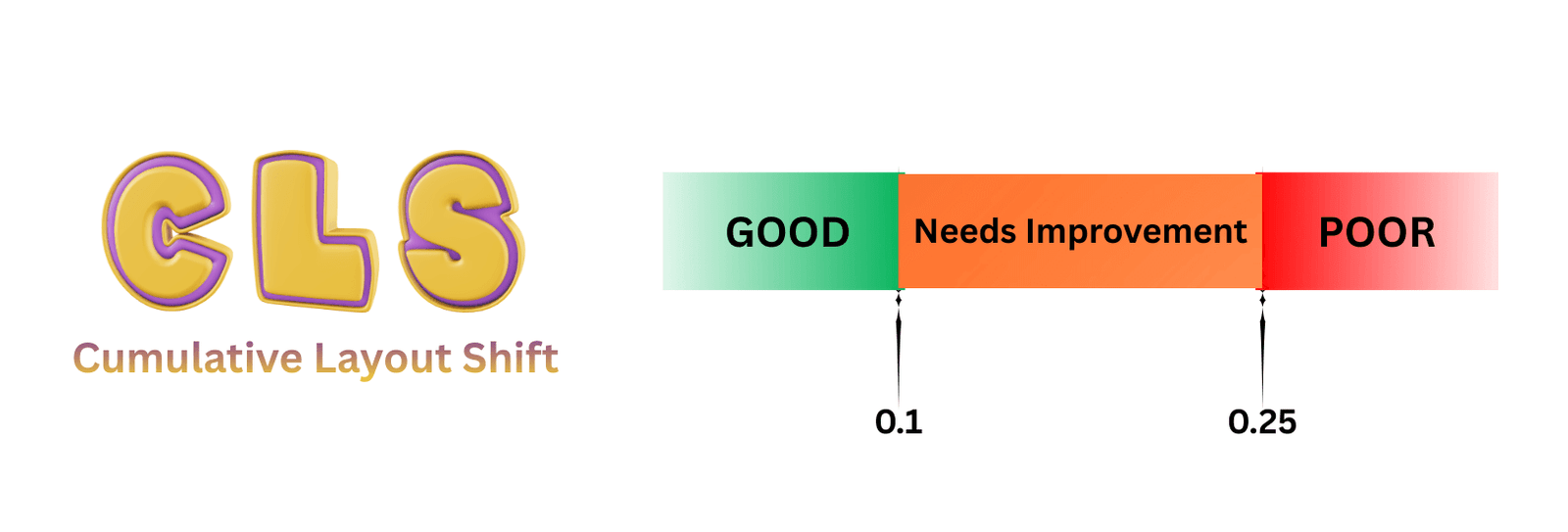
CLS is the cause of the infamous ‘I was just about to click a button and then the page shifted’. This changing page alignment is frustrating to users, often leading to accidental clicks and form errors. Therefore, high CLS is a trust-killer.
Why did Google replace FID with INP?
For years, FID (First Input Delay) was the interactivity metric in Core Web Vitals. In March 2024, Google officially replaced FID with INP (Interaction to Next Paint) after a long experimental period. The reason was simple: FID only measures the delay on the first interaction, while INP measures the worst interaction delay across the entire visit of the user. In this way, INP reflects the real experience much more accurately as compared to FID.
From March 12, 2024 onwards, Core Web Vitals are:
- LCP (Largest Contentful Paint) – loading performance
- INP (Interaction to Next Paint) – overall interactivity
- CLS (Cumulative Layout Shift) – visual stability
Google also said that page experience is no longer a single ranking system. Instead, CWV and other UX signals are some of the many factors that core ranking systems evaluate.
So, here is the smart move in 2026:
- Think about Core Web Vitals as supporting signals that reinforce strong content.
- Leverage them to minimize friction, boost engagement, and increase conversions.
- Don’t be obsessed with small score improvements that don’t cause business metrics to move.
How to Correctly Measure Core Web Vitals in 2026?
Many SEO professionals still think of PageSpeed Insights as a decisive factor, but that thought process is no longer valid. If you want to make decisions on the basis of real performance, you need to blend the field data with the lab data to catch issues early on before they affect your traffic or revenue. Here’s a quick breakdown of RUM vs lab data core web vitals.
Field data: what real users experience (RUM)
This is what matters to Google for Core Web Vitals’ scoring.
- Google Search Console Core Web Vitals report: combines the CrUX data by groups of URLs and classifies such data as Good, Needs improvement, or Poor.
- Chrome UX Report (CrUX) in Looker Studio offers more flexible segmentation, from country to device type.
- RUM platforms, such as Cloudflare, Datadog, or custom front-end RUM scripts, can display CWV by page type, device, and traffic source.
You can use the field data to answer all your questions, like which templates of blog, category, or products, etc, fail CWV the most. Or whether mobile users suffer more than desktop users. Or if changes in recent code have significantly improved actual real-world performance or not.
Lab data: how your site behaves in controlled tests
Lab tools assist you in debugging and working through experiments.
- PageSpeed Insights: It includes lab as well as field data, where it provides you the prioritized suggestions.
- Lighthouse in Chrome DevTools: provides detailed performance analysis and breaks down the main-thread activity.
- WebPageTest, GTmetrix, and similar tools: provide filmstrips, waterfalls, and aggregate multi-location tests that display what prevents LCP from occurring and how scripts load over time.
The lab data is used to reproduce a slow LCP or high INP situation and see which resources block the rendering. It also suggests the test fixes in staging before you ship.
Practical steps to measure Core Web Vitals
- To start, head to Search Console and find which groups of URLs are poor.
- Open some representative URLs in PS Insights and Lighthouse.
- List the major problems associated with LCP, INP, or CLS.
- Log them as tickets and mention their clear business impact for your dev or product teams.
Step 1: LCP Best Practices in 2026
If you have a slow LCP, your website feels as dull as possible. The vast majority of LCP problems are related to heavy assets, slow servers, or blocking scripts. Below is a step-by-step guide to improve LCP in 2026.
Important Factors to Improve LCP
Modern image formats and optimization
Use hero images and other large visuals in WebP or AVIF, which can be 30-50% smaller than JPEG in most cases. Opt for responsive images (srcset, sizes) so that your mobile devices are not forced to download the desktop-sized content.
Critical rendering path
Only inline the truly critical CSS for above-the-fold content. Apart from it, try to defer or async non-critical JavaScript so it doesn’t block the first paint.
Server and network performance
Leverage a reputable CDN that caches HTML and static files near your audience. Activate HTTP/2 or HTTP/3 and also compression, such as Brotli, to speed up the transfer.
Preload important resources
Preload primary Hero image, webfont, or Critical CSS to improve perceived first render.
For good SEO teams, the victory is proving that LCP fixes lead to actual results. There are countless studies that prove faster load times increase engagement and conversions, which help with rankings and revenue in the long term.
Step 2: How to improve INP
INP is the area where lots of JS-heavy sites will falter post-2024. Both Google and many performance vendors point out that large bundles, long tasks, and third-party scripts are typically the culprits.
Factors to Improve INP in Practice
Audit JavaScript size and complexity
Use Lighthouse and DevTools to discover long tasks in the main thread. Break up monolithic bundles and slow-loading features that users won’t be accessing on initial interaction.
Defer non-critical scripts
Analytics, heatmaps, chats, and testing tools, etc, are often executed early and stand like an evil on the performance street in your way of improving responsiveness. Load them after the first meaningful interaction or with defer and async attributes where needed.
Prioritize user-visible work
When your user pushes a button, update the UI immediately, even if there’s still some work going on behind the scenes. Use methods like requestIdleCallback or task chunking to prevent blocking operations from becoming long.
Choose frameworks and patterns carefully.
Today’s frameworks and methodologies, such as React Server Components, Astro, Qwik, and partial hydration techniques, have the goal of shipping less JavaScript by default. Using a framework with aggressive code-splitting and caching strategies can dramatically improve INP on large apps.
Step 3: How to fix CLS issues and stabilize layouts
CLS is usually the most straightforward core web vital ranking factor. If things jump around while loading, there’s your CLS issue.
CLS best practices for 2026
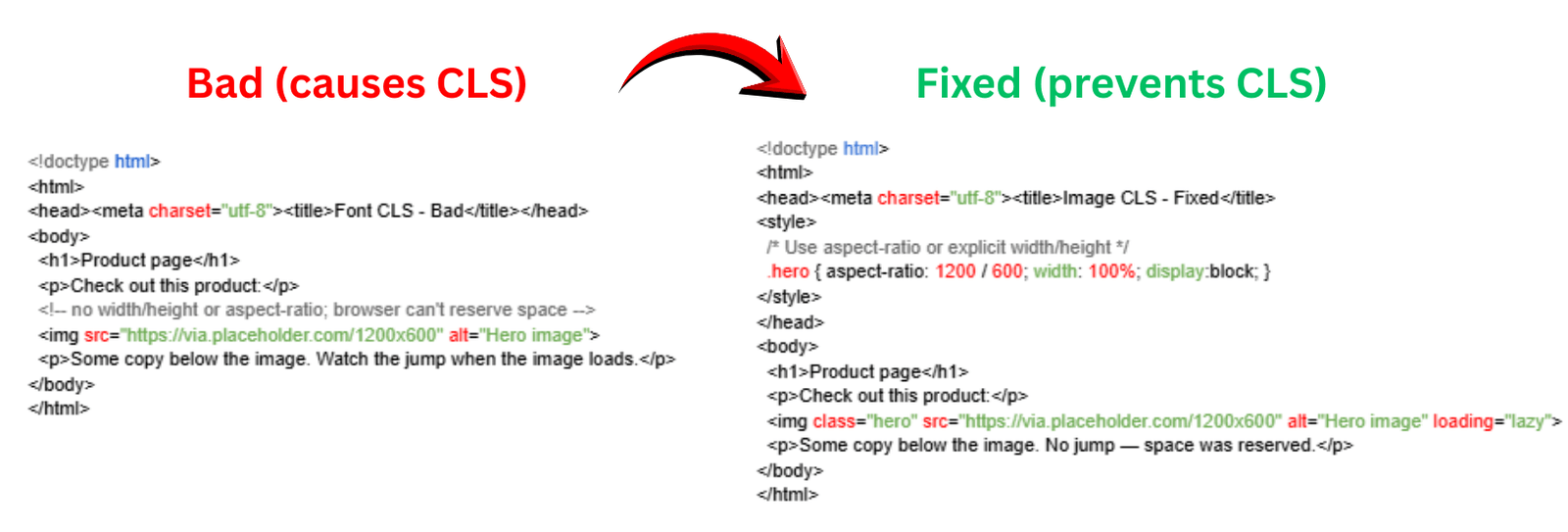
Reserve space for images and embeds
Always set width and height for images, videos, embeds, or use CSS aspect-ratio. This keeps the layout from thrashing when assets are loaded and added to the page.
Handle ads and pop-ups carefully.
Make containers for ads to reserve display space, so that the content won’t be pushed around when the ad shows. Don’t add banners or sticky bars at the top of the viewport during page rendering.
Optimize webfont loading
Use font-display: swap or other fallback strategies, so text appears first in a fallback font instead of staying invisible.
Minimize layout shifts on interaction.
If the user clicks on a button and an adjacent panel appears, scroll the user’s perspective to it rather than jerking their viewport a million pixels off-screen.
The risks for these also tend to be low with potential reward, which explains why many consider CLS a great starting point when seeking quick improvements in technical SEO performance.
Are Core Web Vitals really a ranking factor in 2026?
Yes, core web vital ranking factors still hold much importance, just not in the black and white fashion that many SEO professionals envision. They’re just one signal out of hundreds that influence search engine results.
Great Core Web Vital scores absolutely can contribute to higher rankings and happier users, but they’re not a replacement for relevance, intent matching, or content depth. Even Google itself has warned against getting obsessed with tiny speed gains in an attempt to nudge up your metrics. It might look nice on a dashboard to have a perfect score, but only minimal return comes out of all that engineering investment.
And that’s where the nuance comes in 2026. If your Core Web Vitals are bad, you’re probably leaving traffic, conversions, and user trust on the table. A slow, unreliable site is a turn-off to visitors even more so than ever, and search engines take notice of it.
But beyond the healthy state your metrics should be in, your biggest growth lifts usually come from tightening up topic authority, drilling into internal linking, getting structure dialed, and content created that actually answers user intent. Cutting 50 milliseconds off INP won’t out-rank an article that is more useful, more comprehensive, and more trusted.
You should treat Core Web Vitals like you’d treat site security or mobile responsiveness. They’re basic hygiene, essential but not the hero of your SEO narrative. Nail them, and let the quality of your content and topical expertise carry you from there.
Mistakes to Avoid with Core Web Vitals
Even veterans of SEO can get caught in a few traps.
Treating CWV as a one-time project
Performance degrades as new scripts, tags, and content are added over time. Don’t treat CWV as a one-time project, but keep an ongoing check on it.
Relying on one tool and one test
Single PageSpeed Insights passes, and single Lighthouse scores are just too noisy. Naturally, you’ll want to cross-check with Search Console and RUM tools.
Optimizing only the homepage
Users usually don’t hang out on the homepage; they visit product pages, blog posts, and category pages. If your core templates are sluggish, fixing the homepage alone isn’t going to budge your CrUX data.
Ignoring JavaScript bloat
Many teams compress images to kilobytes but ignore megabytes of unused JS, which is often the real reason your INP is poor.
Not involving developers early
Performance is a cross-functional responsibility. Teams can only reap the best fruits when SEO, dev, design, and product agree on shared goals and guardrails.
Final Thoughts
In 2026, the Core Web Vitals aren’t just something you optimize for a Google update. They are a direct means to know whether your website actually feels fast, responsive, and trustworthy for real humans. You’ll be winning more than just a technical scorecard by improving all three core web vitals: LCP, INP, and CLS. It becomes easier for people to digest your content, to take action, and then come back. That’s what Google’s ranking systems are attempting to reward, and it is also what delivers real-world business results.